Don't be a fanboy of any model
TL;DR
- My 2025 usage graph: Claude → GPT → Gemini → Claude. Zero loyalty.
- Switched from Claude in March because it hid errors with patches instead of fixing them
- Benchmarks don’t reflect your stack; the leading model might be terrible for you
- Practical guide: have 2-3 models ready, try another when something fails, don’t migrate everything
My year in Cursor
This is my model usage graph in Cursor during 2025:
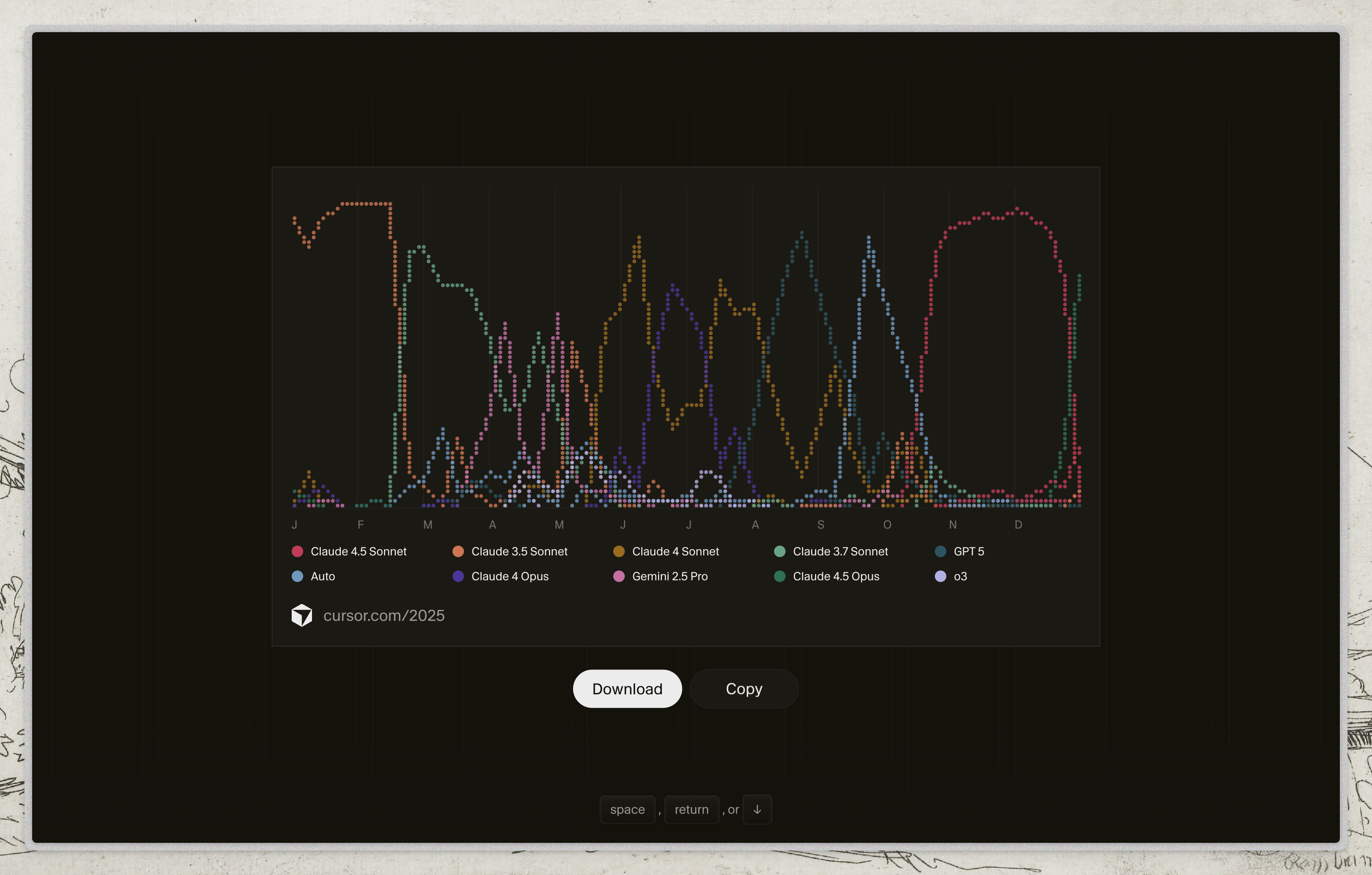
This isn’t a survey. It’s not aggregated “community” data. It’s my personal history of a year writing code with AI.
And what it shows is that I jumped from model to model with zero loyalty.
What actually happened
January-February: Claude 3.5 Sonnet
Started the year with Claude. Worked fine, was my default.
March-May: GPT 5
I switched. Why? Claude had started doing something that drove me crazy: it invented patches that hid errors instead of fixing them.
I wrote about this in detail in Sonnet and the hardcode problem. The summary: debug prints that stayed forever, try/except that silenced everything, hardcoded values that “worked” in tests but exploded in production.
The code “worked” because the error was hidden. GPT 5 was more honest: it told you “I don’t know” or failed visibly. I prefer a loud error over a silent patch.
June-August: Gemini 2.5 Pro and Auto
Another switch. Tried Gemini, tried Auto mode. Why? Sometimes you just want to see if there’s something better. And sometimes there is, for certain tasks.
September-December: Back to Claude
The new models (3.7, 4, 4.5) improved. I came back. Not out of loyalty, but because they worked better for what I needed.
What I learned
1. Benchmarks aren’t your code
A model can lead on HumanEval and be terrible for your specific stack. Or the opposite.
Your project has weird dependencies, patterns only you use, context no benchmark captures.
2. Models change (and so do you)
March’s Claude isn’t December’s Claude. They’re literally different versions with different behaviors.
And your needs change too. What worked for one project might not work for the next.
3. “My favorite model” is a trap
When you become a fanboy of a model:
- You ignore its failures (“must be something on my end”)
- You don’t try alternatives (“why bother?”)
- You waste time defending it on Twitter
Meanwhile, someone with no loyalty is using what works.
4. Auto mode isn’t that bad
I had a bias against the automatic selector. “I know better which model to use.”
But there are periods in my graph where Auto worked well for me. Sometimes the best decision is not to decide.
Practical guide
Signs you should try another model:
- The model “fixes” things without you understanding how
- Errors magically disappear (spoiler: they don’t disappear)
- You’ve spent three attempts explaining the same thing
- Generated code keeps getting longer and more convoluted
How to try without wasting time:
- Have 2-3 models configured and ready
- When something fails, try the same prompt on another
- Don’t migrate everything, just what doesn’t work
- Give it a week before deciding
What NOT to do:
- Switch models every hour
- Assume the newest is the best
- Assume the most expensive is the best
- Argue on the internet about which is better
Conclusion
My graph has more colors than a rainbow. And that’s fine.
I’m not married to any model. I use Claude when it works, GPT when it works better, Gemini when I want to experiment, Auto when I don’t want to think.
The best model is the one that solves YOUR problem TODAY. Tomorrow it might be another one.
Don’t be a fanboy. Be pragmatic.
You might also like
Using AI cost $1000. Now it costs $1. What's your excuse?
AI costs dropped 1000x in two years. If you're not using it, it's not about money. It's fear, ignorance, or laziness.
AI won't take your job. Someone who uses it better will.
Excel has been around for 40 years and hardly anyone masters it. AI will be the same. Your edge isn't the tool—it's how long you've been using it.
The AI bubble: 7 trillion looking for returns
Who wins, who loses, and why you should care. Analysis of massive AI investment and its bubble signals.